
If your H2O X5 steam mop is leaking, spitting water, or suddenly producing little to no steam, don’t assume it’s dead.
The official troubleshooting guide points to a much shorter list of causes: an empty tank, blocked steam nozzle, limescale, loose attachments, or a saturated cleaning cloth.
Start with the simple fixes before considering replacement.
H2O X5 Problems At A Glance
| Problem | Likely Cause | First Thing to Try |
| No steam | Empty tank, clogged nozzle, scale | Fill tank and descale |
| Weak steam | Limescale buildup | Clean steam outlet |
| Steam/water from safety valve | Blocked outlet | Stop using and descale |
| Mop leaking | Loose attachment or fault | Refit parts; stop if leak continues |
| Water spits from head | Condensation, clog, too much moisture | Check steam path and cloth |
| Cloth becomes soaked | Pad saturated | Replace or wring out pad |
| Steam escapes at connection | Attachment not fitted correctly | Cool unit and reconnect |
| Unit won’t power on | Outlet/switch/power issue | Test outlet and power switch |
| Leaves streaks | Dirty/wet pad or residue | Use clean microfiber pad |
| Steam output drops repeatedly | Hard-water scale | Use distilled water in hard-water areas |
Let’s elaborate them one by one:
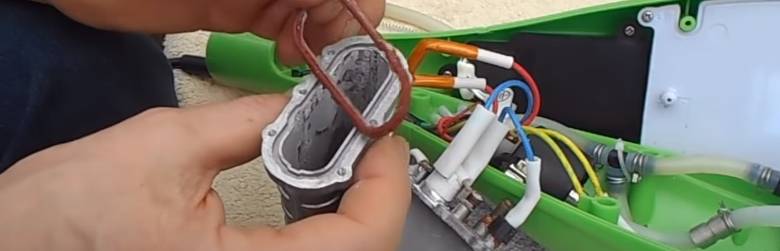
- H2O X5 Not Producing Steam
No steam is probably the most common H2O X5 complaint.
The official troubleshooting table gives three primary causes:
- Water tank is empty
- Steam nozzle is blocked
- Limescale has built up
The manufacturer’s recommended order is equally simple: fill the tank, remove the mop head and clean the nozzle, then perform the limescale-removal procedure if necessary.
I would start there rather than taking the appliance apart.
If the unit powers on but produces no steam, check the water level first. Then unplug it, let it cool completely, remove the mop head, and inspect the steam outlet for mineral buildup.
- Weak or Intermittent Steam
If the X5 still produces steam but much less than it used to, limescale is the most likely explanation.
Thane’s manual says mineral deposits can build up on the metal components over time and greatly reduce performance. It recommends removing scale every 25–50 full tanks of water or at least once a month, particularly in hard-water areas.
That’s a useful maintenance interval to add to your article because your current page treats scaling mainly as something to repair after the mop stops working.
Preventive descaling is better.
How to descale the X5
The official manual gives you two approaches.
First, the supplied cleaning pin can be inserted into the steam outlet and moved gently to dislodge scale.
Second, you can descale the internal water path with either:
- H2O Descaler, or
- A 1:1 solution of white vinegar and water
The manufacturer says to leave the solution in the tank for at least 12 hours for best results, then run it through the system and flush thoroughly with fresh water.
- Can You Put Vinegar in an H2O X5?
Yes—but only for the manufacturer’s descaling procedure.
This is an important correction because steam-cleaner advice online is inconsistent.
The X5 manual specifically allows a 50/50 solution of white vinegar and water for limescale removal. It also says not to use malt vinegar.
However, that does not mean you should routinely mop floors with vinegar inside the water tank.
The manual separately warns against putting aromatic liquids, alcohol-based cleaners, or detergents into the tank during normal use.
So the safe distinction is:
Vinegar for descaling according to the manual: yes.
Adding random cleaners or fragrances to the tank while mopping: no.
- Steam or Hot Water Comes From the Safety Valve
This is more serious than a little sputtering at the mop head.
The official manual says the pressure-release valve can discharge hot steam or water if the steam nozzle becomes blocked by scale.
If that happens, the manufacturer tells you to:
- Stop using the X5 immediately.
- Turn it off.
- Unplug it.
- Let it cool.
- Clean the steam nozzle and remove scale.
The discharged steam or water can be extremely hot, so keep hands and other body parts away from that valve.
Your current article should add this distinction because pressure-valve discharge is not something readers should treat as an ordinary leak.
- H2O X5 Leaking Water
The official troubleshooting guidance says water or steam leaks can occur when an accessory isn’t properly connected or debris prevents a proper connection.
The recommendation is to shut the unit off, let it cool, remove the attachment, inspect the connection, clean it, and reattach it correctly.
Argos’ current H2O X5 support page also recommends checking that all parts are securely fitted and looking for blockages if the unit leaks. If the leak remains, it advises contacting support.
That matches an important warning in the manual:
Stop using the appliance if you observe water leakage.
I would therefore avoid advising readers to keep running a leaking steam mop while troubleshooting internal seals.
Hot-water leakage from an electrical appliance is a safety issue.
- Damaged Parts
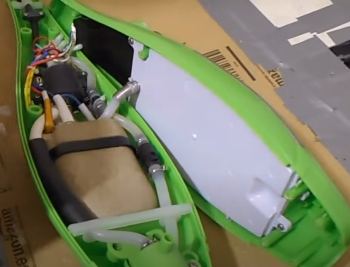
Another textbook issue that tends to happen over time.
If you have already tried lowering the water level in the tan and the water leakage still continues, you have to assume the leakage is happening due to damaged parts inside your H20 X5.
Now, there are multiple parts that can be damaged for various reasons, so it’s hard to tell about the issue with disassembling the steam mop.
If you look at the H20 X5, you’ll notice that it’s super easy to disassemble. Just disassemble the steam mop, and the damage should be at the tank, cap insert or filter.
If you can determine for sure any of these parts are damaged, the best option is to claim for the warrant or replacement.
If you still fail to notice any visible issue, then reassemble the parts mentioned above firmly again. At this point, you should have solved the water leakage problem of your H20 X5.
Troubleshooting Steaming Issue of H20 X5 Mop
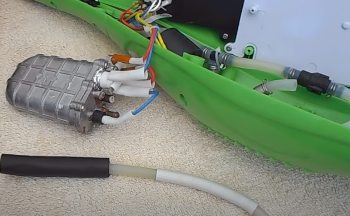
There is absolutely no need to worry here as I am here to help you with a pretty easy or any special tool-less solution to this issue.
It’s a daunting problem for sure, but you’ll be surprised to know how easily you can fix it at home.
So here is a step by step guide on how you can remove limescale and get rid of steaming issues on your H20 X5.
- Step 1
First, let the steam mop rest for a few minutes to let it cool down. Then you need to unscrew the main body of the mop to get to the mop and the pipe out of it. Get a screwdriver and open the body.
- Step 2
Now that you have opened the mop, you’ll notice several wires as well as pipes going through it here and there. You will have to remove all of them to get to the boiler.
When you are disassembling those pipes and wires, make sure you remember the location correctly. It’ll come in handy later when you put the mop back together.
- Step 3
After removing all the pipes and wires, you should easily notice the boiler lying inside with a plastic cover. The cover isn’t attached with screws or anything, so you can easily just pull it off the boiler.
- Step 4
Once you get your hands on the little boiler inside, remove the power cable and the feed pipe from it with a plier to make the boiler dissemble easier.
If any wire is soldered, no need to remove that as soldering it afterwards will be another hassle.
- Step 5
Usually, the limescale buildup happens either inside the boiler or into the fed pipe. It’s relatively easier to clean the limescale buildup in the pipe because you can access it from outside.
But for the boiler, you’ll have to disassemble it to get to the limescale.
- Step 6
Now, what you need to do is disassemble the boiler. There are a few screws on top, and you should be able to open the top lid by unscrewing them easily.
While unscrewing, be careful about the seal between the top lid and the rest of the boiler. Damaging it might cause water leakage afterwards.
- Step 7
When you disassemble the bolder, you’ll immediately notice thing chunks of limescale on the inner surface of the boiler.
This limescale basically blocks the water circulation hole of the heater and stops the steam from passing through. A quick rubbing with the hand should remove the layers of limescale from the body.
- Step 8
As for the circulation hole and outlet, take a paper clip and straighten it. Now with that pin, just unblock the hole and the outlet.
After the hole, grab the feed pipe and remove its internals out. Inside the pipe, there is a metal spring where the limescale gets stuck. Clean that metal coil and put it back in the pipe.
- Step 9
As for the seal on the boiler, make sure it seals the boiler properly. If your unit has a silicon seal instead of rubber, it’s most likely to get ruined during boiler disassembly.
In that case, you can use a heat resistant concealer to do the job. After all the limescale is cleaned, put everything back together as they were.
Here is a effective troubleshooting video that will help you a lot!
Water Leaking Issue
Another common issue H2O X5 owners report is the steam mop leaking water as they clean. There are a few ways to address this problem:
Overfilled Tank
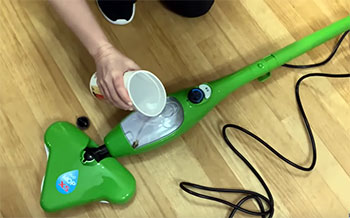
The most likely culprit is overfilling the water tank. Make sure you don’t exceed the max fill line. Overfilling can force water to leak from the steam vents.
Obstructed Float
A clogged or stuck float mechanism can also lead to leaking. Check that the float moves freely and isn’t obstructed. Clean the float with a cotton swab if needed.
Damaged Tank
In some cases, cracks, ruptures, or seal failures in the tank itself can cause leaking even when not overfilled. Inspect closely for any damage, and replace the tank if needed.
Loose Hose Connection
If the hoseconnecting the tank to the mop body has become loose, this may allow water to leak out. Tighten the connection securely.
Checking the fill level, float, and tank integrity can resolve most leaking problems. Make sure to only use distilled water as well, as impurities can obstruct seals and valves over time.
X5 Turned On But Not Heating
It can be incredibly frustrating if you turn on your X5 mop but it fails to heat up and produce any steam. Some things to check in this situation:
Working Electrical Outlet
Make sure the X5 is plugged into a functioning grounded outlet. Test the outlet with another device to confirm power is working.
Secure Power Cord Connection
Check that the power cord is fully plugged into the socket on the X5 handle. If loose, steam activation can fail.
Reset Button
If the reset button on the plug is popped out, press it back in. This button is triggered if the unit overheats.
Heating Element Issue
In some cases, an electrical issue or mechanical problem with the heating element may prevent the X5 from heating up. This requires internal repair or replacement.
Water Tank Engaged
The mop will not heat if the water tank is not fully inserted. Make sure the tank clicks fully into place.
Start by checking the power supply and connections. If those are fine, a deeper electrical or hardware problem is likely the culprit.
Also Read: Is Tyent Water Ionizer Worth It?
FAQs
Here are some frequently asked questions about troubleshooting H2O X5 steam mop problems:
If your X5 is not steaming, the most likely culprits are an empty water tank, a clogged or damaged steam nozzle, scale buildup inside the unit, or a problem with the heating element. Check those elements and descale the mop if needed.
Common reasons a steam mop stops producing steam include a lack of water, clogged nozzle or steam vents, excessive scale buildup, failing heating element, damaged power cord, or other electrical malfunction. Proper maintenance and replacement of damaged parts can often get it working again.
When functioning properly, the X5 is an effective steam mop that can sanitize floors and surfaces without harsh chemicals. However, some users feel it underdelivers on steam production compared to advertisements. Maintaining the mop and descaling regularly helps it live up to expectations.
If a floor steam mop fails to produce steam, the likely problems include an empty water tank, loose power connections, overfilled and leaking tank, a tripped reset button, scale buildup, or heating element failure. Checking these areas can reveal the cause for no steam output.
Conclusion
Here we are at the end of the article. Whether you own or planning to buy one, this article should be helpful for you to solve the H20 X5 steam mops problem and work as a heads-up for you.
However, on the bright side, this mop has other benefits that far outweigh the problems. So, if you are planning to buy one for yourself to clean your bathroom, just go for it.
Recent Posts
Neutrogena Ultra Sheer Sunscreen Review From My Experience: Is It Worth It?
I tried Neutrogena Ultra Sheer Dry-Touch Sunscreen and found a lightweight SPF 45 formula that makes a practical choice for daily face and body protection.The main intent of this article is to...
West Shore Bathroom Remodel Reviews: My Take After The Crew Left
I walked into my bathroom last month and realized the old tub had become more liability than luxury. Water spots everywhere, a door that stuck, and that constant worry about the next leak.After...